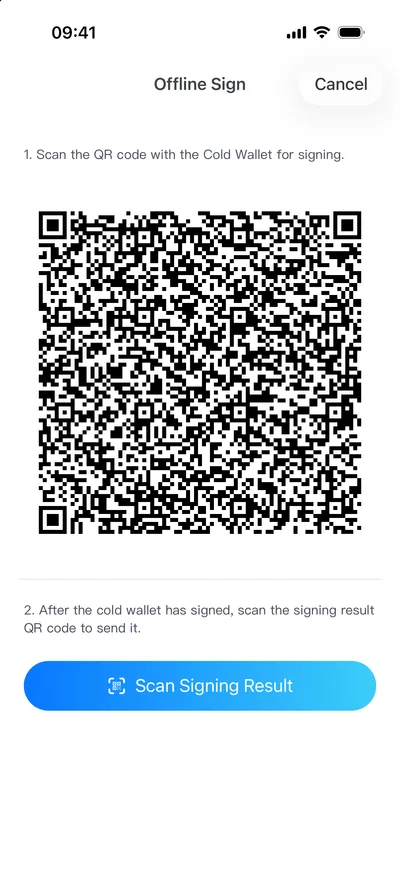
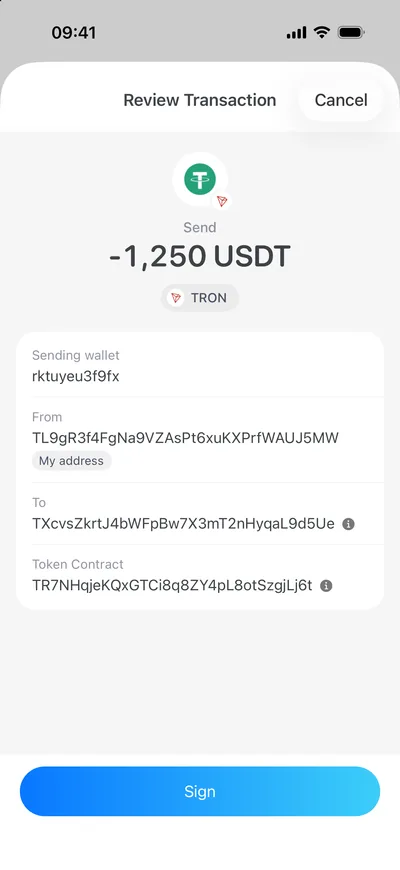
Ownbit's phone cold wallet fits better if
- you have a spare phone at hand
- your assets span several chains, including USDT on TRON
- you want to check every character of an address on a big screen
- you plan to use MultiSig with family or colleagues

Both keep your keys offline. The difference is which device you have to trust, what it costs, which chains it covers, and what happens when something goes wrong. Here is a comparison that tries to be fair — including where hardware wallets are stronger.
Both keep the keys off the internet. These three situations help you decide quickly.
A green tag marks the side with the edge on that point. Where hardware wallets are stronger, we mark that too.
| Point | Ownbit phone cold wallet | Ledger | OneKey |
|---|---|---|---|
| Device | A spare phone you already own — nothing to buy ✓ Cheaper | Nano S Plus from $59; Flex $249; Stax $399 | Classic 1S Pure from $79; Pro $278 |
| Software cost | The cold wallet is part of membership, from $69 / year (hot wallet and 2-2 MultiSig included) | Official app is free | Official app is free |
| Where the key lives | On the offline phone, encrypted by the app; the phone never goes online | Secure element ✓ Stronger | Secure element ✓ Stronger |
| Link to the online device | QR codes only — camera and screen; no cable, Bluetooth or network ✓ Smallest attack surface | USB; Bluetooth on Nano X, Flex and Stax | USB, Bluetooth; QR signing on Pro |
| Screen for checking | A full phone screen with the whole address, amount and contract data ✓ Easier to check | Small screen on Nano; E Ink touchscreen on Flex and Stax | Small screen on Classic; touchscreen on Pro |
| Physical attacks | Relies on the phone's encryption and the app password; a stolen phone with a weak password is a risk | Secure element built to resist chip-level extraction ✓ Stronger | Also a secure element ✓ Stronger |
| Open code | Since 5.0 the iOS key-handling code (seed, storage, derivation, signing) is open source under MIT | Secure-element firmware is closed; some apps are open | Firmware and app open source; the maker cites reproducible builds |
| Where the device comes from | A phone from your own source; factory-reset it before installing | Buy from ledger.com or a trusted seller; in 2026 tampered units were sold through a reseller | Also best bought from the official store |
| MultiSig | Built in, with offline signing; BTC, EVM chains, TRON, Solana and more ✓ Built in | Through third-party software such as Safe or Sparrow | Mostly through third-party software |
| Supported assets | BTC, ETH, TRON, Solana, XRP and other major chains with their tokens | Thousands of assets ✓ Wider coverage | Many major chains and tokens |
| Backup and recovery | A standard BIP39 seed phrase that restores in other compatible wallets | BIP39 seed; plus the optional paid Ledger Recover (ID check, encrypted seed shards held by third parties) | BIP39 seed |
Prices are the makers' US reference prices from October–November 2026; features per the makers' public material. Both may change — check the official store before buying.
Every hardware-wallet user should know this one. The chip was not broken; the device in the user's hands was no longer the one that left the factory.
Ledger begins investigating reports of drained wallets and asks CryptoBilis, an authorised reseller in Malaysia, to stop selling and shipping.
Ledger explains that an organised criminal group bought genuine devices, fitted hidden components inside and sold them back through distribution; the implant captures the recovery phrase during setup.
Ledger confirms tampered units in Berlin and investigates two suspected devices in Dubai; it asks anyone who bought a device in Berlin since January 2026 to contact support.
There is no flaw in the secure element or the operating system, and no confirmed case involves a device bought on ledger.com. Genuine Check cannot detect added parts while the original secure element is intact. Ledger advises affected users to set up a new wallet on a new device from ledger.com with a new seed, reusing neither the old seed nor the passphrase.
Ledger has not published a loss figure. A third-party on-chain analysis estimates about 335 wallets in Southeast Asia and roughly $102 million affected; the investigation continues and the numbers may change.
Any signing device you buy separately and have shipped to you comes with one more question: is it the original? Ownbit's cold wallet uses your own phone, which skips that step — but the same logic applies to phones: use one from a source you trust and factory-reset it before installing. Whatever the device, the most reliable answer is MultiSig: one tampered device cannot reach the threshold.
Sources: Ledger's statement (2026-10-15) · Ledger's investigation update (2026-11-18) · BleepingComputer · Bitcoin Magazine. Related: The 2026 Ledger tampered-device case: what it means for cold storage · Ledger Recover and self-custody
Install Ownbit on a spare phone, create or import the wallet, then keep it offline for good. The key lives only on that phone.
Your everyday phone imports addresses only, to see balances and prepare transfers. It holds no keys.
The offline phone scans the transaction, you check it on the big screen and sign, and the signature is scanned back to the everyday phone to broadcast.
Phone or hardware wallet, single-key means "this one device is everything". MultiSig spreads the signing across devices and people: if one fails, the funds stay safe.
It depends on the threat. Against physical extraction, a hardware wallet's secure element is stronger. A phone cold wallet's strengths lie elsewhere: it exchanges data only by QR code, with no cable, Bluetooth or network; you check the whole transaction on a large screen; and there is no shipped device that could have been tampered with. For most people what decides safety is whether the key ever goes online, and whether the risk is spread across a MultiSig.
No need to replace it. If you mostly hold BTC and ETH with a single key, a hardware wallet is enough. If you need a USDT MultiSig on TRON, shared control with family or a team, or batch approvals in a web console, Ownbit fills that gap.
Any phone on iOS 15.6 or Android 8.0 or later whose camera scans QR codes reliably. Factory-reset it, install only Ownbit, remove the SIM, turn off Wi‑Fi and Bluetooth, and never connect it again.
No. Keep it switched off and put away; turn it on when you need to sign. Charge it now and then, and keep the seed phrase backed up offline somewhere safe.
Ownbit uses a standard BIP39 seed phrase, so you can restore in other compatible wallets. MultiSig assets have a self-recovery guide that does not depend on Ownbit's servers.
No extra device to buy. Download Ownbit and sign offline between two phones with QR codes.