


The most capable phone cold wallet you will ever own may already be sitting in a drawer. Any reasonably modern smartphone — factory-reset, stripped of its SIM, and permanently cut off from every network — can do the essential job of a hardware wallet: generate private keys on a device the internet cannot reach, and sign transactions that cross to the online world as QR codes. No purchase, no shipping record with your home address attached, no new device to learn.
The idea is worth stating plainly before any of the details. A cold wallet is defined by a single property: its private keys live on a machine that never connects to the internet. Nothing about that property requires purpose-built hardware. A spare phone can hold it as strictly as a dedicated signer, provided you set the device up deliberately and never let the gap close afterward. This guide covers the setup we recommend, the trade-offs worth weighing honestly, and the habits that keep a phone cold wallet genuinely cold.
What a phone cold wallet actually is
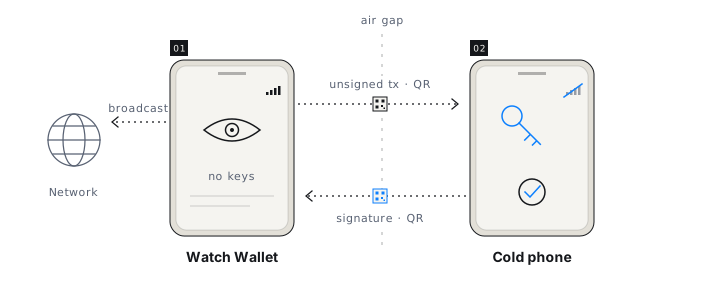
A phone cold wallet is a spare smartphone that generates and stores private keys entirely offline and signs transactions by exchanging QR codes with an online device. It splits your wallet into two halves with sharply different jobs. The offline phone holds the keys and does exactly one thing: it inspects unsigned transactions and produces signatures. Your everyday phone runs a Watch Wallet — a companion that holds no private keys at all. It tracks balances, builds unsigned transactions, and broadcasts signed ones; because it carries no secrets, compromising it steals nothing.
The two halves communicate through the narrowest channel practical: the camera. An unsigned transaction goes in as a QR code; a signature comes out the same way. There is no cable, no Bluetooth pairing, no Wi-Fi handshake — nothing that offers the online world a path to the keys. A QR code is also the rare data channel a human can reason about: it is small, visible, and carries only what fits in the image.
An honest comparison with hardware wallets
Dedicated hardware wallets are good tools, and if you already own one you trust, nothing here argues for discarding it. The case for a spare phone is not that hardware wallets are flawed; it is that the phone's trade-offs are better than most people assume, and the marginal cost is zero.
Weigh the phone's disadvantages first. It runs a general-purpose operating system with a far larger code base than a secure-element signer, which is why the setup below severs networking permanently instead of trusting the OS to behave. It was not designed as a bearer instrument, so physical custody habits matter. And it is only as cold as your discipline — a hardware wallet cannot casually join a Wi-Fi network; a phone can, if you let it.
Now the other column. A full-size screen lets you read every field of a transaction before signing — the discipline that mattered most in February 2025, when roughly $1.5 billion left a Bybit cold multisig because every signer trusted the same compromised interface. Modern iOS and Android devices encrypt storage by default and anchor that encryption in dedicated secure hardware. A repurposed phone creates no shipping record linking a signing device to your home — a real consideration since a major hardware vendor's customer database leaked in 2020. And the 2023 backlash over Ledger's opt-in Recover service underlined a broader point: even purpose-built hardware ultimately asks you to trust vendor firmware. Every custody scheme trusts something; the phone's version of that trust is at least assembled from parts you already own and understand.
Setting up the spare phone, step by step
The whole procedure takes an evening. The order matters: the phone touches the internet exactly once, early, and never again.
- Wipe the phone. Factory-reset it and remove the SIM. Skip every optional account sign-in the setup assistant offers. The device is about to become single-purpose, and everything it previously carried is attack surface.
- Go online once, briefly. Connect to Wi-Fi, install the latest system updates, and install Ownbit from the official app store. This is the last network connection the device will ever make.
- Sever the connections. Enable airplane mode and switch Wi-Fi and Bluetooth off. Ownbit's cold wallet is designed so the device never needs the network again after this point — not for signing, not for anything.
- Create the wallet offline. Only now, with the phone air-gapped, generate the wallet. The keys are born on a device with no route to the internet. Write the BIP39 seed phrase on paper or steel — never in a screenshot, never in a cloud note — and store it somewhere the phone is not.
- Pair the Watch Wallet. On your everyday phone, install Ownbit and add a Watch Wallet by scanning the pairing QR code shown on the cold phone. The online phone now sees addresses and balances but holds nothing an attacker can spend with.
- Rehearse with a small amount. Receive a token sum, then sign a small spend through the full QR round trip. Move serious funds only after the drill works end to end.
How a transaction crosses the gap
Spending starts on the online phone. The Watch Wallet builds the unsigned transaction and displays it as a QR code; you scan it with the cold phone. What happens next is the moment this whole design exists for: the offline screen shows the transaction as the device holding your keys understands it — destination, amount, fee — before any signature exists.
Verify on that screen, and be thorough about the address. Read it in full, not just the first and last four characters, because address poisoning is built on the assumption that you will check only the ends. The offline screen is the right place for this check precisely because it is the one display an internet-side attacker cannot reach: the Bybit signers all verified on screens fed by the same poisoned interface, while an air-gapped phone gives your final confirmation a surface that malicious web code has no path to.
Approve, and the cold phone renders the signature as a QR code. Scan it back with the Watch Wallet, which broadcasts the completed transaction to the network. Note the asymmetry in what crossed the gap: inbound, a transaction that was never secret; outbound, a signature that becomes public the moment it reaches the chain.
The unsigned transaction goes in, the signature comes out, and the key never crosses in either direction.
Habits that keep a phone cold wallet cold
The setup is the easy part. The property you are protecting is behavioral, and it erodes through exceptions, not through exotic attacks.
- Never reconnect — not even for an update. If new software ever seems to matter enough, prepare a fresh device from scratch and migrate with the seed phrase. The air gap is only as strong as your refusal to make a one-time exception.
- Treat the seed phrase as the real wallet. The phone is replaceable hardware. If it dies, is lost, or is stolen, the BIP39 phrase restores the same keys on another device — which also means the written phrase deserves stricter custody than the phone itself.
- Store the phone charged and locked away. Lithium batteries left at empty degrade; top the phone up a few times a year and keep it somewhere physically secure, separate from the seed backup.
- Keep the verification habit. Full address, exact amount, every time, on the offline screen. The routine transactions are the ones an attacker will dress up.
One signer, or one of several
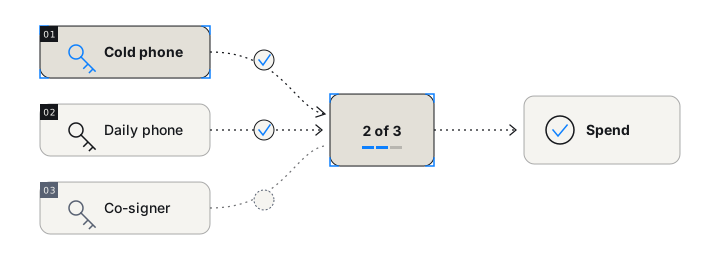
Everything above describes the phone as a standalone wallet, and for many holders that is enough. But the same device slots unchanged into a multisig. In an Ownbit MultiSig wallet, spending requires M of N keys — 2-of-3, say — and the air-gapped phone simply becomes one of the signers: QR in, QR out, exactly as before, but now as one voice in a quorum.
A practical shape for an individual: the cold phone holds one key, your everyday phone holds a second, and a third lives with a person or place you trust. No single stolen key moves anything; no single lost key strands anything. Every key in an Ownbit multisig is a standard BIP39 seed phrase, Ownbit's servers coordinate signing but never hold keys, and recovery remains possible without Ownbit's infrastructure — the scheme is standards-compatible, and self-recovery guides exist. If you already keep a hardware wallet, its mnemonic can even be imported as one participant of a cold multisig alongside the phone.
Frequently asked questions
Is a phone cold wallet as secure as a hardware wallet?
Set up correctly, it holds the property that defines cold storage: keys on a device that never touches the internet. A dedicated signer has a smaller software attack surface; a phone answers with a full-size verification screen, hardware-backed encryption, and no purchase trail. For both, the dominant risks are identical — seed-phrase custody and careless verification — so the discipline matters more than the device.
Does the offline phone ever need internet again after setup?
No. It connects once to install system updates and the app, then goes into airplane mode permanently. From then on, unsigned transactions come in and signatures go out as QR codes, so signing, receiving, and balance checks never require the cold phone to touch a network.
What happens if the spare phone is lost or breaks?
Nothing is lost, provided the seed backup exists. The wallet is the BIP39 seed phrase, not the hardware; restoring the phrase on another offline device recreates the same keys. If the phone was stolen rather than broken, device encryption buys time, but the prudent response is to move funds to a fresh wallet.
Can a phone cold wallet be one signer in a multisig?
Yes. In Ownbit, the air-gapped phone can hold one key inside an M-of-N MultiSig and sign its share by QR code exactly as it does standalone. That combines cold storage with the removal of any single point of failure, since no individual key — cold or hot — can move funds alone.
If a retired phone is within arm's reach, testing this costs an evening and nothing else. Ownbit's cold wallet pairs the offline phone with a Watch Wallet in a few QR scans, and the same device can later join a MultiSig as your holdings grow. Every new user gets a 7-day free trial, and the keys are yours regardless.