


Every wallet app bundles two very different jobs into one interface: showing you what you own, and moving it. A watch-only wallet unbundles them. It imports public information only — a list of addresses, or an extended public key (xpub) — and holds no private key material at all. That gives it exactly half of a wallet’s powers: it can display balances, track history, generate receive addresses, and even prepare a transaction ready for signing. What it can never do is sign. No compromise of a watch-only wallet, however complete, produces a valid signature, because the material a signature requires simply is not there.
That sounds like a limitation, and it is — a deliberate one. The split between watching and signing is the quiet backbone of every serious cold-storage setup: the device that faces the internet knows everything and can do nothing, while the keys live on a device that faces nothing at all. Here is how a watch-only wallet works, what it can and cannot do, the one privacy caveat that surprises people, and how the split runs in day-to-day practice.
One seed, two kinds of key
Everything rests on an asymmetry that is easy to state and hard to overstate. A private key produces signatures; the matching public key can only verify them. Computing the public key from the private key is instant; going the other way is the hard problem the entire system is built on. Addresses are in turn derived from public keys, so information flows strictly one way — seed, private keys, public keys, addresses — and never back up the chain.
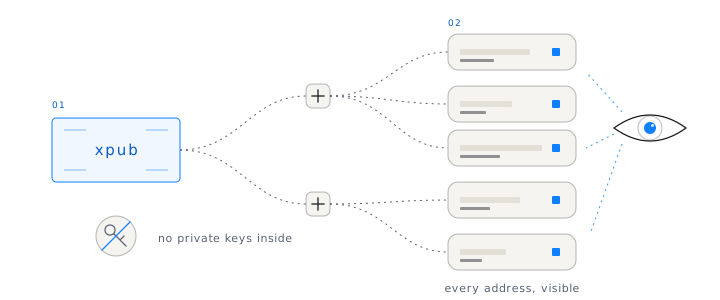
Hierarchical deterministic wallets — the BIP32 standard, introduced in 2012 and now close to universal — extend that asymmetry from single keys to whole wallets. One seed generates a tree of key pairs, and the tree has a public half of its own: the extended public key, or xpub. An xpub can derive every receiving address a wallet will ever use, but it cannot derive a single private key. Import that xpub into another app and you have rebuilt the wallet’s complete public face — every address, every balance, every transaction, past and future — with nothing inside it that can spend. That is a watch-only wallet: the full map, with the engine removed.
What it can do — and where it stops
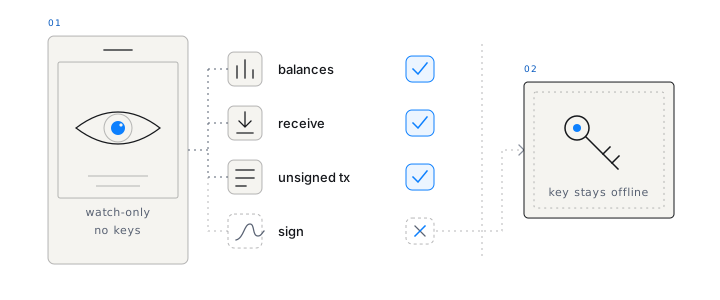
Concretely, a watch-only wallet built from an xpub can:
- Show balances and history across every derived address, updating as payments arrive and confirm.
- Generate fresh receive addresses, so you can accept deposits without going anywhere near a private key.
- Build unsigned transactions — choose coins, set the fee, name the destination — packaged in a standard format (on Bitcoin, typically a PSBT) that a separate signer can read and approve.
- Broadcast a signed transaction once a signature arrives from somewhere else.
And that is the complete list. It cannot sign, spend, sweep, or authorize anything, under any circumstances. It can prepare a transaction down to the last byte, but the decisive act always happens elsewhere. Steal the phone it runs on and you have stolen a view. The name is precise rather than modest: the wallet genuinely only watches.
A watch-only view turns the most exposed device you own into the least dangerous one.
Why cold storage is built on this split
Cold storage has a contradiction at its core. The whole point is that private keys never touch an internet-connected machine — yet you still need to see balances, take deposits, and eventually spend, and all of that involves the network. Something has to stand in the middle, and that something is the watch-only wallet.
The standard loop looks like this. The watch-only view, on the online device, builds an unsigned transaction and hands it across the air gap — typically as a QR code or a file. The offline signer, which holds the keys and no network connection, displays what it is being asked to approve, signs, and passes back the signature alone. The watching half then broadcasts. Keys never move in either direction; unsigned transactions cross one way, signatures cross the other. Crucially, the seed phrase never has to be typed into, restored on, or even shown to a machine that has been online — and since a seed phrase is a single point of failure, keeping it off networked hardware entirely is worth a little ceremony.
Hardware wallets are the same architecture in different packaging. The companion app on your computer is, functionally, a watch-only wallet, and the device on the cable is the signer — a sound design in both forms. The differences are the transport (USB or Bluetooth versus QR codes, which are easier to inspect as they cross) and whether you buy dedicated hardware at all. Ownbit’s cold wallet implements the QR version with two ordinary phones — more on that below.
The privacy caveat: an xpub is a map
The spending-safety of watch-only views makes people casual about xpubs, and that deserves a correction. Anyone who holds your xpub can see every address your wallet has used or will ever use — the complete balance, the complete history, updating forever. They cannot take anything, but they can watch everything, and for many holders that is nearly as sensitive. A leaked xpub cannot be rotated quietly, either: the only real escape is moving the funds to a fresh wallet built from a fresh seed.
So treat the xpub as confidential even though it is technically public-key material. Hand individual addresses to counterparties, never the xpub itself. Import it only into apps and services you would trust with your full financial history — a portfolio tracker is a convenience, but it is also a standing disclosure to whoever operates it. The one place broad xpub sharing is genuinely unavoidable is multisig, where co-signers must exchange xpubs to construct the shared wallet; that is a contained, deliberate disclosure among people who already share custody.
What people actually use watch-only wallets for
Cold-storage pairing is the flagship use, but the pattern earns its keep in ordinary situations too:
- Monitoring long-term holdings. Keep an eye on savings from the phone in your pocket without carrying spending power around with it.
- Verifying deposits. Confirm that an exchange withdrawal or an invoice payment actually landed, without unlocking anything that can move money.
- Read access without spend access. An accountant, an auditor, or a co-founder can follow a treasury’s history with zero ability to touch it — read and write become separate permissions, the way they always should have been.
- Watching a shared multisig. Every participant in a 2-of-3 multisig can track the wallet in real time while spending still requires a quorum. Visibility is universal; authority stays thresholded.
How Ownbit pairs a Watch Wallet with an offline phone
Ownbit builds the split in as a first-class flow rather than an expert feature. A spare phone, kept permanently offline, becomes the signer: it generates a standard BIP39 seed phrase, holds it, and never connects to anything. Your everyday phone runs the Watch Wallet — the watch-only half — which knows the wallet’s addresses, shows balances, and constructs unsigned transactions. To spend, the Watch Wallet displays the unsigned transaction as a QR code; the offline phone scans it, shows exactly what is about to be signed, signs, and displays the signature as another QR code for the online phone to scan back and broadcast. Nothing but those two QR codes ever crosses the gap, and no extra hardware is involved. If you already own a Ledger or Trezor, the same mnemonic can be imported into the offline phone to bring existing keys into a cold multisig.
The trust boundaries apply to us the same way they apply to everyone else. Ownbit’s servers coordinate signing but never hold user keys; every key is a standard BIP39 seed phrase; and the security model is designed so recovery works even without Ownbit’s servers. A watch-only view you cannot independently verify is just one more screen you are forced to trust — the point of this architecture is that you are not.
Frequently asked questions
Can a watch-only wallet be hacked?
It can be compromised, but the attacker gains visibility, not funds — there is no private key material to steal, so no signature can be forged. The realistic danger is deception: malware on the online device could display a swapped receive address or a manipulated transaction. That is exactly why an offline signer that shows the true transaction details before signing matters, and why large deposits deserve an address check on the signing device.
Is it safe to share my xpub?
It is spend-safe but privacy-sensitive. An xpub cannot be used to move funds, but whoever holds it can see every address your wallet derives, with full balances and history, indefinitely. Share individual addresses with counterparties, and reserve the xpub for devices, services, and co-signers you trust with your complete financial picture.
Can I send crypto from a watch-only view?
Not by itself. A watch-only wallet can build an unsigned transaction and broadcast a signed one, but the signature must come from a device that holds the private keys — an offline phone, a hardware wallet, or another signer. The pairing of the two halves is what makes a complete spending flow.
What is the difference between a watch-only view and a cold wallet?
They are the two halves of one design. The cold wallet is the offline device that holds keys and signs; the watch-only wallet is the online window that holds no keys but handles everything the network requires — balances, receive addresses, unsigned transactions, broadcasting. Used together, keys stay offline permanently without giving up day-to-day usability.
If you want to try the split without buying anything, Ownbit’s cold wallet turns a spare phone into an offline signer paired with a Watch Wallet on your daily phone — unsigned transactions in, signatures out, keys never online. The broader security model is built on the same principle of minimized trust, and your keys remain yours regardless of membership. Every new user gets a 7-day free trial.