


Use XLM in a personal wallet, a cold-wallet setup, or a multi-party MultiSig approval flow, depending on how the assets are owned.
Back to home

Support modes
Supported assets
Best fit
XLM
Stellar MultiSig Wallet
Hold Stellar (XLM) with self-custody, QR-based offline signing, and flexible on-chain MultiSig in Ownbit.
MultiSigCold WalletWallet
XLM plus Stellar issued assets such as USDC and EURC
shared treasuries, family vaults, and higher-control wallets
About Stellar
What is Stellar (XLM)?
Stellar is an open payment network built for fast, very low-cost transfers and for issuing assets such as stablecoins, reaching agreement through a federated consensus protocol rather than mining. Multi-signature is part of the protocol: an account can hold several signers and require a threshold of them to approve each operation. Ownbit creates a Stellar MultiSig by adding every member as a signer, setting the account thresholds to your chosen approval count, and reducing the master key to weight zero, so the chain itself enforces the rule. A wallet manages XLM along with issued assets such as USDC and EURC through trust lines, with air-gapped cold-wallet signing.
Stellar
SEP-0005 · BIP39
Wallet · Cold wallet · MultiSig
What you can do with it
Stellar in Ownbit
Self-custody by design
Your XLM mnemonic and keys are generated and encrypted on your own device — never uploaded for remote custody.
Cold wallet
Track XLM on a Watch Wallet and sign offline on an air-gapped phone; transactions move as QR codes.
On-chain MultiSig
the chain's own account signer list requires 2-of-3 or weighted approvals before any XLM moves.
How it works
How Stellar works in Ownbit
On Stellar, an Ownbit MultiSig is the chain's own account signer list: every member is registered as a signer on a fresh account, the approval threshold is written on-chain, and the account's master key is then permanently retired. From that point the chain itself rejects any spend without the required number of signatures — no server and no single key can override it. QR-based offline signing keeps the keys on an air-gapped phone.
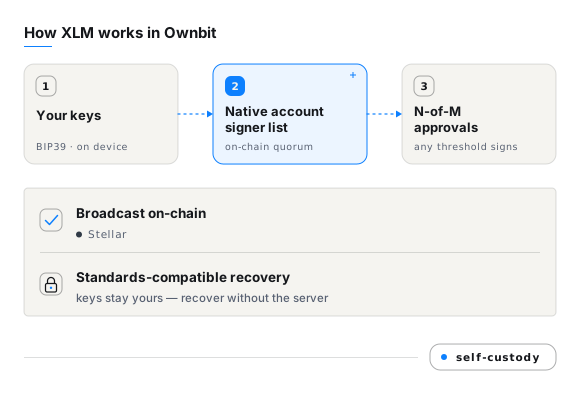
Recovery and compatibility
Stellar recovery & compatibility
For standard Stellar wallets, recovery completes with your mnemonic or private key in any compatible wallet. For MultiSig, each participant keeps an independent key and can recover from the wallet's on-chain configuration without depending on Ownbit's servers.
FAQ
Stellar wallet — frequently asked questions
Does Ownbit support Stellar MultiSig?
Yes. Ownbit supports on-chain M-of-N MultiSig for Stellar — the chain's own account signer list. You can set anything from a 2-of-2 personal wallet to weighted enterprise approvals, and the threshold is enforced on-chain rather than by a server.
Which Stellar assets can I hold?
Ownbit manages XLM plus Stellar issued assets such as USDC and EURC on Stellar.
Is my Stellar self-custodial in Ownbit?
Yes. Your XLM mnemonic and private keys are generated and stored encrypted on your own device. Ownbit never holds them and cannot move, freeze, or access your funds.
Can I use Stellar as a cold wallet?
Yes. Pair a Watch Wallet on an online phone with an offline signing phone; unsigned and signed transactions move between them as QR codes, so your keys never touch the internet.
How do I recover my Stellar if I lose my phone?
Restore your BIP39 mnemonic in Ownbit or a compatible wallet. For MultiSig, each participant recovers with their own key plus the wallet's public configuration — no Ownbit server required.
Download
Ready to manage Stellar in Ownbit?
Download the app on iOS, Google Play, or via direct APK — self-custody from the first screen.