Part of Ownbit's protection works before anything reaches your screen: look-alike poisoning transfers are filtered out, and transfers to sanctioned or Tether-frozen addresses are refused. The rest is in front of you before you sign: every dApp request is decoded on your phone, checked against a built-in contract list and graded by risk.
Poisoning transfers filtered out on EVM chains, TRON, Solana, Bitcoin and TON
Every request decoded on your phone: 209 function signatures, 1,852 known contracts
Four risk levels, each with the reason spelled out
These checks run on Ownbit's servers, so most of the time you won't notice them. That is the point: the dangerous transfer never lands in your history, or never leaves your wallet.
Poisoning transfers filtered out
Address poisoning plants a look-alike address in your history with a zero-value or dust transfer, hoping you copy it next time. Ownbit's servers filter these transfers out of your history on EVM chains, TRON, Solana, Bitcoin and TON, so the look-alike is never there to copy.
In the app as well: a zero-amount token transfer is listed without an address, copying an address that isn't yours takes an extra tap, and on TRON the confirm page tells you when it is your first payment to an address.
Sanctioned and frozen addresses refused
A transfer to an address on public sanctions lists is refused, and so is a USDT transfer to an address Tether has frozen. USDT sent to a frozen address is frozen with it and no wallet can undo that, so Ownbit stops the transfer instead of letting it through.
Your own address, checked too
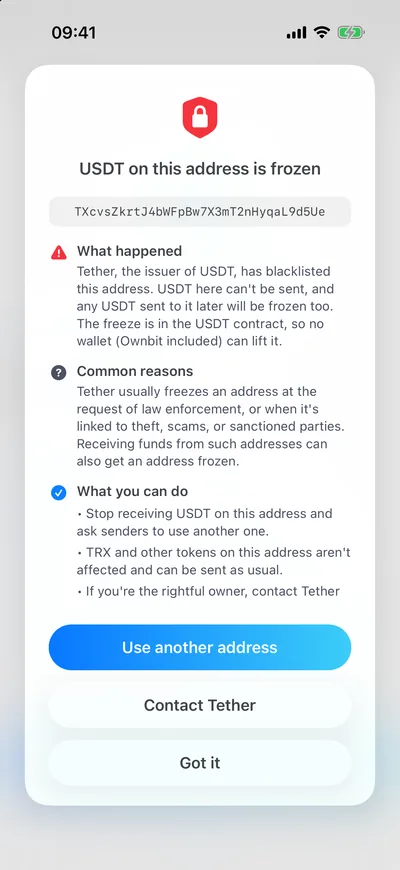
Open a TRON receive page and Ownbit checks the address first. If Tether has frozen it, you are told before anyone pays you. If its permissions have been changed, a common sign that the account was taken over, the QR code is replaced with a warning.
If Tether has frozen your TRON address, the receive page says so before anyone pays you
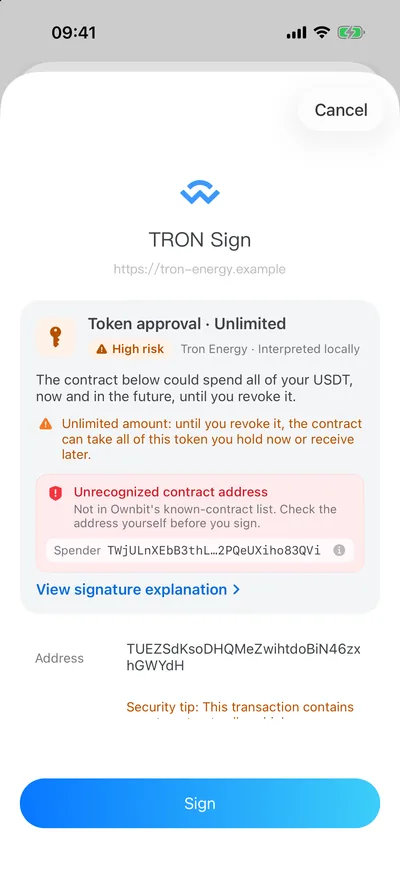
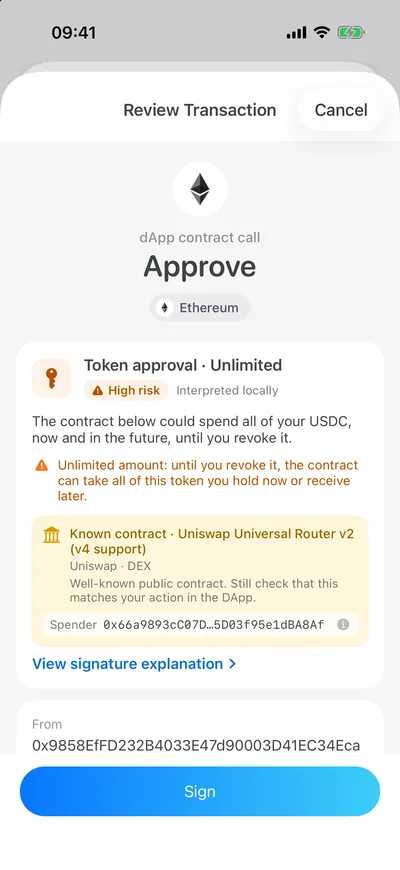
When a dApp asks for a signature through WalletConnect, Ownbit decodes the request on your phone, from tables that ship in the app, before the Sign button is in reach. A card at the top says what the request does, how risky it is and why.
Reading the card
1
What it is
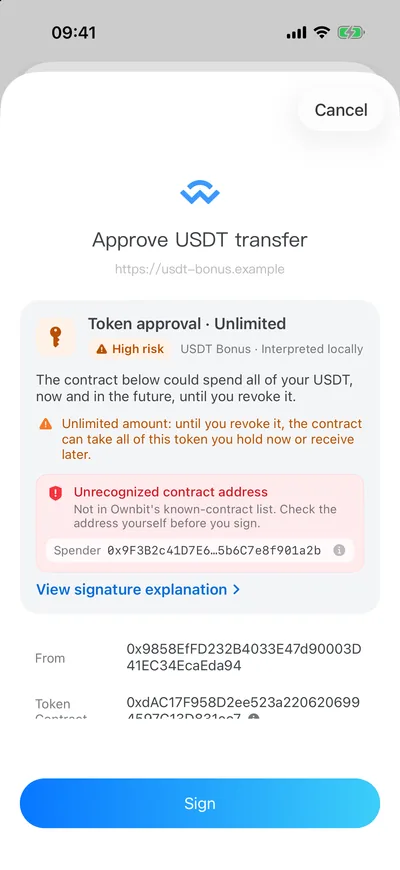
The kind of request and the amount: “Token approval · Unlimited”.
2
Risk level
Low, medium, high or critical, worked out on the phone.
3
In one sentence
What signing would let the other side do.
4
Warnings, with reasons
Not just “be careful”: what is unusual about this request.
5
Who you're dealing with
A known contract by name, or an unrecognized address in red.
6
The full explanation
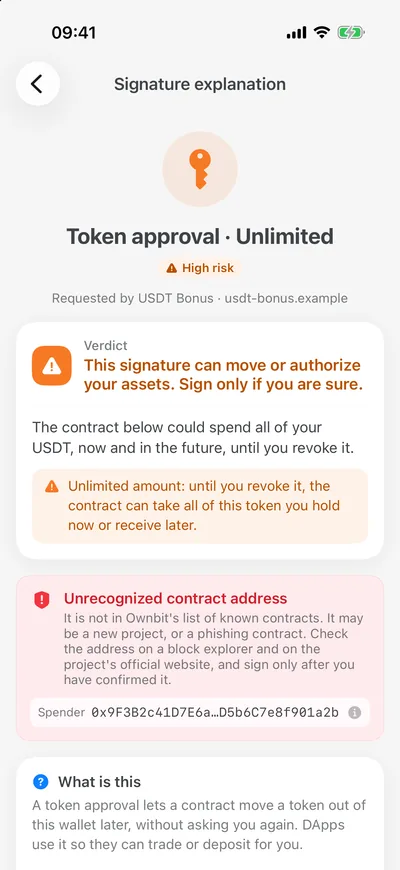
Field by field, with the raw data exactly as the dApp sent it.
Four risk levels
From a harmless sign-in to a drainer
The level comes from what the request would allow, not from how it looks. Typical examples:
Low
Revoking an approval
Signing readable text
A sign-in request that matches the site
Medium
An approval with a set limit
A function Ownbit doesn't recognize, on a known contract
A permit that lasts over 30 days or never expires
High
Unlimited approvals and permits
Sending value to an unrecognized contract
A swap that pays out to someone else
Signed data meant for another chain
Critical
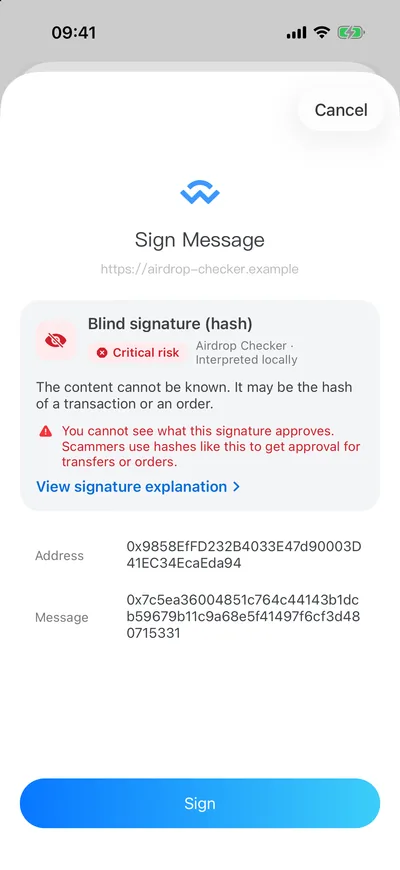
Blind signatures (eth_sign, a bare hash): you can't see what they approve
Approving all your NFTs at once
A sign-in domain that doesn't match the site
Ownership, upgrade and delegate-call operations
One request is refused outright: changing a TRON account's permissions through WalletConnect.
Known contracts are amber, never green
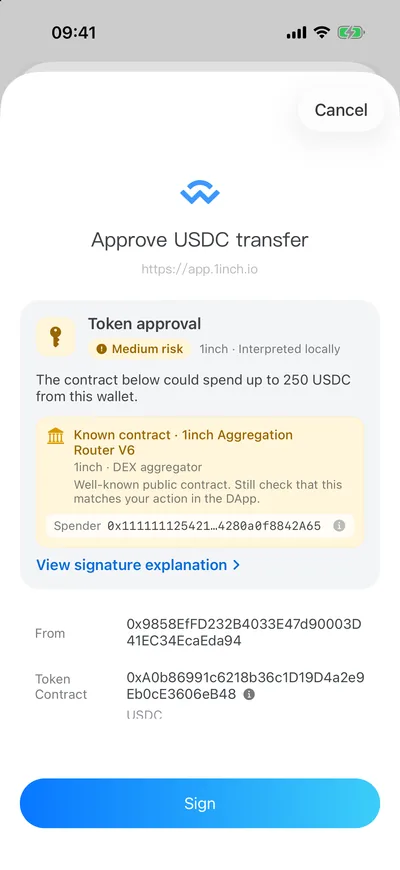
1,852 contracts on Ethereum, BNB Chain, Arbitrum, Base, Optimism, Polygon, HyperEVM, TRON and Solana ship inside the app. A match is shown by name, in amber; an address that isn't on the list is shown in red. Being well known says who a contract is, not that this request is what you meant.
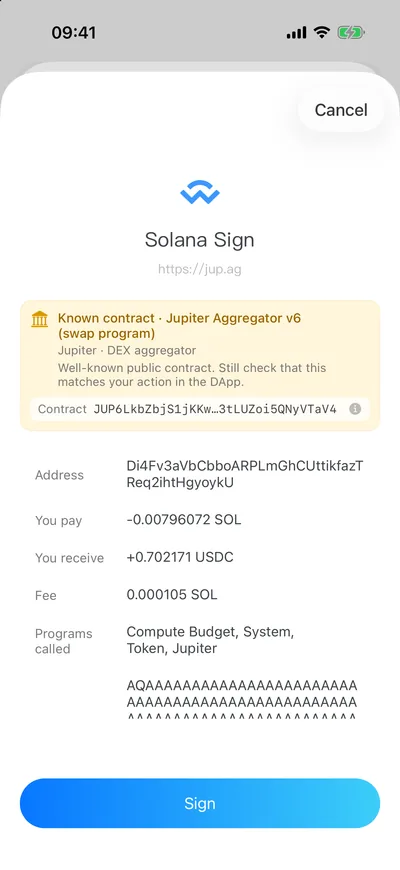
Known contract · 1inch Aggregation Router V61inch · DEX aggregator
Well-known public contract. Still check that this matches your action in the DApp.
Spender 0x111111125421…4280a0f8842A65
Unrecognized contract address
Not in Ownbit's known-contract list. Check the address yourself before you sign.
Spender 0x9F3B2c41D7E6…5b6C7e8f901a2b
What gets decoded
EVM
Transactions, approvals, Permit and Permit2, swaps and router steps, batches up to three levels deep, typed data (EIP-712) including marketplace orders, sign-in requests and messages.
TRON
Transfers, TRC20 contract calls, staking and resource delegation, votes and permission changes, read from the transaction bytes themselves.
Solana
Known programs by name, and a balance preview simulated before you sign: you pay this, you receive that.
In the app
TRON: an unlimited approval to an unrecognized contract
The explanation, field by field
Solana: the balance change, before you sign
Layer 3 · Every signer
Every signer sees the same thing
In February 2025, Bybit's signers approved a theft because the screen in front of them looked normal. In Ownbit, each phone decodes the request for itself.
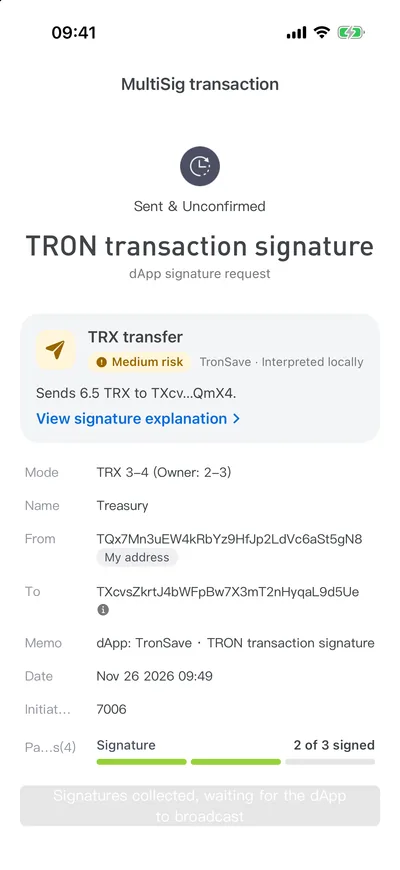
A co-signer's view of a MultiSig dApp request
The offline phone, decoding an unlimited approval
MultiSig co-signers
A dApp call proposed in a MultiSig reaches the other signers already decoded: the same card and explanation, from the same tables, on their own phones. Nobody has to approve “0 ETH · approve” on trust.
The offline phone
A cold-wallet phone decodes contract calls from the QR code with the contract list it carries, no network needed. The last screen before the signature is one no online attacker can change.
Web Console payments
A payment started in the Web Console is judged by what the phone parses, not by what the web page says, and a recipient that looks like an address you've used before is flagged.
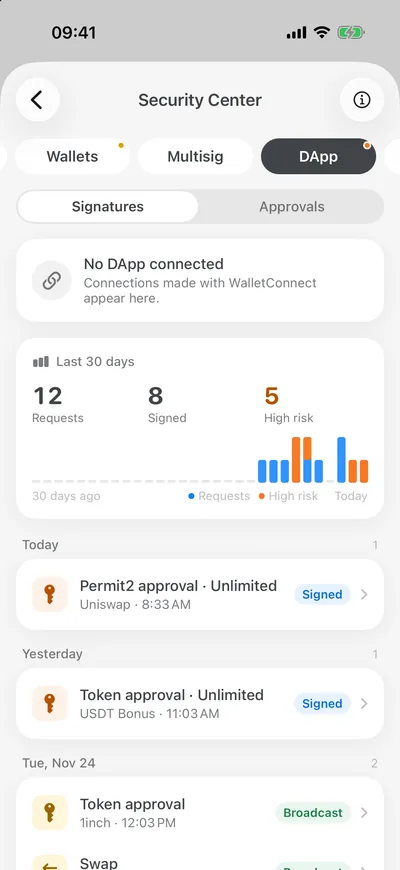
Nineteen checks run on your phone from local data: a cold-wallet device that came online, a mnemonic used on another device, wallets not backed up, weak passwords, MultiSig setups where one signer can spend alone, risky signatures in the last 30 days.
Approval check and revoke
On Ethereum, BNB Chain and TRON, see which contracts may spend your tokens and revoke them all in one go. The receive page warns if an address still has open approvals.
Screenshot protection
Recovery words and private keys stay covered until you tap. A screenshot or screen recording covers them again with a warning, and they're hidden in the app switcher.
App lock and large transfers
Face ID is asked again after a minute in the background. Face ID quick send stops at a limit you choose, $1,000 by default; above it, the wallet password is required.
Encrypted on the phone
Keys are encrypted with scrypt and AES-256-GCM and bound to a key that never leaves the device.
New-device alerts
If your mnemonic is used to log in on another device, the Security Center tells you, so you can move funds first.
Only addresses you own
Balances are shown only for addresses your phone derives itself. An address list from the server is never taken on trust.
Enterprise rules
Recipient whitelists and daily or monthly limits that only a Security Admin can change. They are rules on Ownbit's server, not on-chain, and we say so.
The Security Center's DApp tab: every signature, its risk, and a 30-day chart
Limits
What these checks can't do
No list is complete. A new scam address or contract may not be flagged yet. No warning doesn't mean safe.
Decoding reads a request; it doesn't run it. On EVM chains and TRON, Ownbit shows what a request says. Only Solana requests also get a simulated balance preview.
Interpretations can be incomplete. They come from common formats; the signature itself is what counts, so the raw data is always one tap away.
Warnings inform; you decide. Apart from the refused transfers above, Ownbit doesn't stop you from signing.
FAQ
Questions about transaction safety
Does Ownbit see what I sign?▾
Decoding happens on your phone, from tables that ship in the app; requests aren't sent anywhere to be analysed. Ownbit's servers see what any wallet server sees, public addresses and the transactions they broadcast, and never your keys.
Can Ownbit stop a transfer?▾
In one case: transfers to sanctioned addresses, and USDT transfers to addresses Tether has frozen, are refused before they are broadcast. Every other decision is yours.
Why are known contracts amber, not green?▾
Because “known” answers who a contract is, not whether this request is what you meant. A phishing page can ask you to approve a perfectly real contract.
What happens with a request Ownbit can't decode?▾
It is shown as an unrecognized contract call, at high risk when the contract is unknown, with the raw data one tap away. If you don't know what it does, don't sign it.
Do I need to turn any of this on?▾
No. The filtering, the address checks and the signature card work by default.
Get started
Check before you sign, every time
Connect a dApp and see the card for yourself. Every new user gets a 7-day free trial.