

Use DASH in a personal wallet, a cold-wallet setup, or a multi-party MultiSig approval flow, depending on how the assets are owned.
Back to home

Support modes
Supported assets
Best fit
DASH
Dash MultiSig Wallet
Hold Dash (DASH) with self-custody, QR-based offline signing, and flexible on-chain MultiSig in Ownbit.
MultiSigCold WalletWallet
DASH
shared treasuries, family vaults, and higher-control wallets
About Dash
What is Dash (DASH)?
Dash is a UTXO-based cryptocurrency focused on fast, low-cost payments, run by a two-tier network of miners and masternodes. Its Bitcoin-derived design means standard derivation paths, cold-signing, and on-chain multi-signature scripts work directly. Ownbit supports Dash as a standard wallet, an air-gapped cold wallet, and an on-chain MultiSig.
Dash · UTXO
BIP32 · BIP39 · BIP44
Wallet · Cold wallet · MultiSig
What you can do with it
Dash in Ownbit
Self-custody by design
Your DASH mnemonic and keys are generated and encrypted on your own device — never uploaded for remote custody.
Cold wallet
Track DASH on a Watch Wallet and sign offline on an air-gapped phone; transactions move as QR codes.
On-chain MultiSig
an on-chain P2SH/P2WSH multisig script requires 2-of-3 or weighted approvals before any DASH moves.
How it works
How Dash works in Ownbit
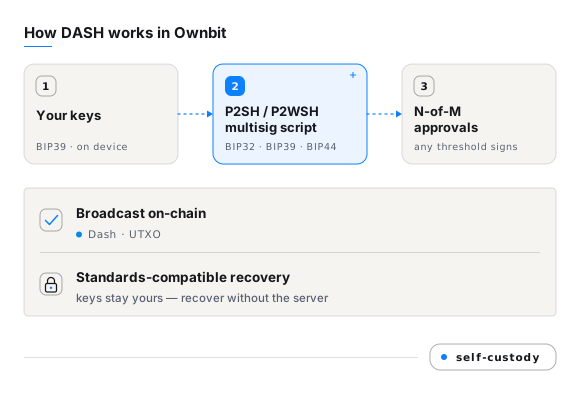
On Dash, an Ownbit MultiSig address is a real on-chain P2SH/P2WSH script that needs M-of-N signatures to spend. Every participant holds an independent key, so no single person — and not Ownbit — can move funds alone. Add a Watch Wallet for tracking and keep signing keys on an air-gapped phone.
Recovery and compatibility
Dash recovery & compatibility
For standard Dash wallets, recovery completes with your mnemonic or private key in any compatible wallet. For MultiSig, each participant keeps an independent key and can recover from the wallet's on-chain configuration without depending on Ownbit's servers.
FAQ
Dash wallet — frequently asked questions
Does Ownbit support Dash MultiSig?
Yes. Ownbit supports on-chain M-of-N MultiSig for Dash — an on-chain P2SH/P2WSH multisig script. You can set anything from a 2-of-2 personal wallet to weighted enterprise approvals, and the threshold is enforced on-chain rather than by a server.
Which Dash assets can I hold?
Ownbit manages DASH on Dash.
Is my Dash self-custodial in Ownbit?
Yes. Your DASH mnemonic and private keys are generated and stored encrypted on your own device. Ownbit never holds them and cannot move, freeze, or access your funds.
Can I use Dash as a cold wallet?
Yes. Pair a Watch Wallet on an online phone with an offline signing phone; unsigned and signed transactions move between them as QR codes, so your keys never touch the internet.
How do I recover my Dash if I lose my phone?
Restore your BIP39 mnemonic in Ownbit or a compatible wallet. For MultiSig, each participant recovers with their own key plus the wallet's public configuration — no Ownbit server required.
Download
Ready to manage Dash in Ownbit?
Download the app on iOS, Google Play, or via direct APK — self-custody from the first screen.