Ownbit · Multisig recovery
EVM multisig: recovering funds received on the wrong network
You have an Ownbit EVM multisig and assets arrived on a chain you didn’t plan for — or one where the multisig isn’t operational. The funds are not lost. Which path you take depends on whether Ownbit supports multisig on that chain.
An Ownbit multisig contract address is derived from its deploy address and that address’s nonce — not from the chain. The same deploy address therefore reproduces the same contract address on any EVM chain. That is the key to every recovery below.
Two situations
A. The chain is supported by Ownbit multisig
Simply create the multisig again on that chain. Because the contract address depends only on the deploy address, redeploying there places the contract exactly where your funds are, and they become spendable through the normal multisig flow.
- Use the same deploy wallet. This is the one requirement — it is what makes the address match.
- Using the same participants and the same threshold/mode is recommended for clarity, but is not technically required.
- Multisig hot wallet: the latest version deploys automatically using that hot wallet — no choice needed.
- Multisig watch-only wallet: you’ll pick a personal hot wallet to perform the deploy.
Once deployed, open the wallet on that chain and transfer the assets out as usual.
B. The chain is NOT supported by Ownbit multisig
Example: Optimism. You can’t recreate the multisig here, so instead you deploy a small Sweeper contract to the same address, then call it to move the stuck assets to your control. Follow the steps below.
How recovery on an unsupported chain works
Import the multisig’s deploy address as a normal single-key wallet, fund it with a little gas, and deploy the Sweeper from it. Because the address is derived from the deploy account, the Sweeper lands on the exact contract address that holds your stuck funds. You then call sweep() / sweepETH() to pull everything back to the deploy address.
The deploy address must have made no outgoing transaction on the target chain (its nonce must be untouched), or the created address won’t match. Funding it (incoming) is fine. You also need a little native gas (e.g. ETH on Optimism) on that address.
Steps (unsupported chain)
Export the multisig’s deploy private key
In Ownbit, open Export Private Key for the multisig and select the address tagged (MS_DEPLOY_INDEX) — this is the address that deployed your multisig contract. Reveal and copy its private key. Keep it offline and never paste it on any website.
If your multisig address was not deployed by the multisig wallet itself, but by a personal hot wallet you selected manually, then the key you export here must be that deploy hot wallet’s private key — not the multisig wallet’s.

Import it as a temporary standard wallet
Create / import a wallet from that key. Set Private Key type = ETH and paste the 64-character hex key. This temporary single-key wallet now controls the deploy address.

Fund a little gas on the target network
Open the imported wallet, switch to the target network’s ETH (here ETH · Optimism), and make sure it holds a small amount of native gas. The stuck asset sits at your multisig contract address on this chain. Do not send anything out from this address yet.

Deploy the Sweeper contract
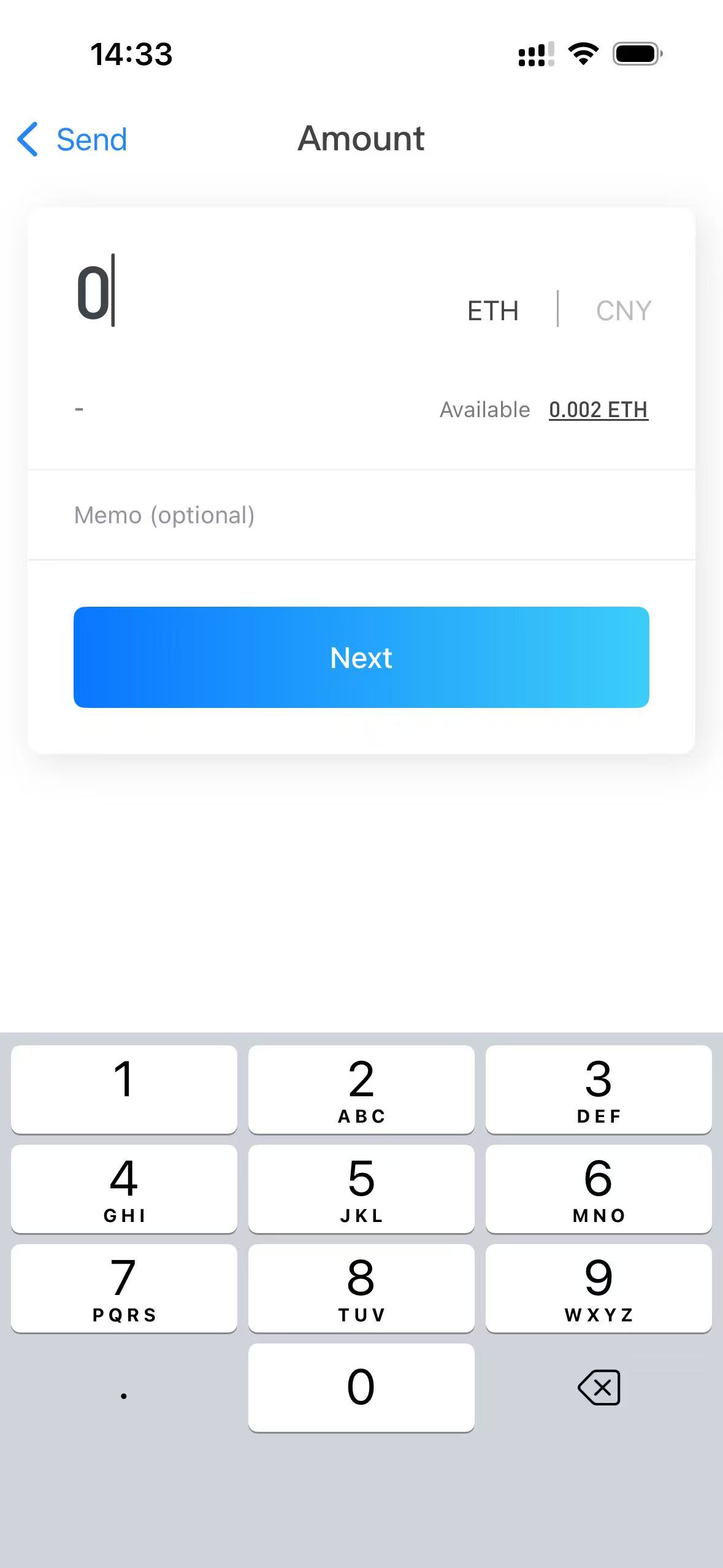
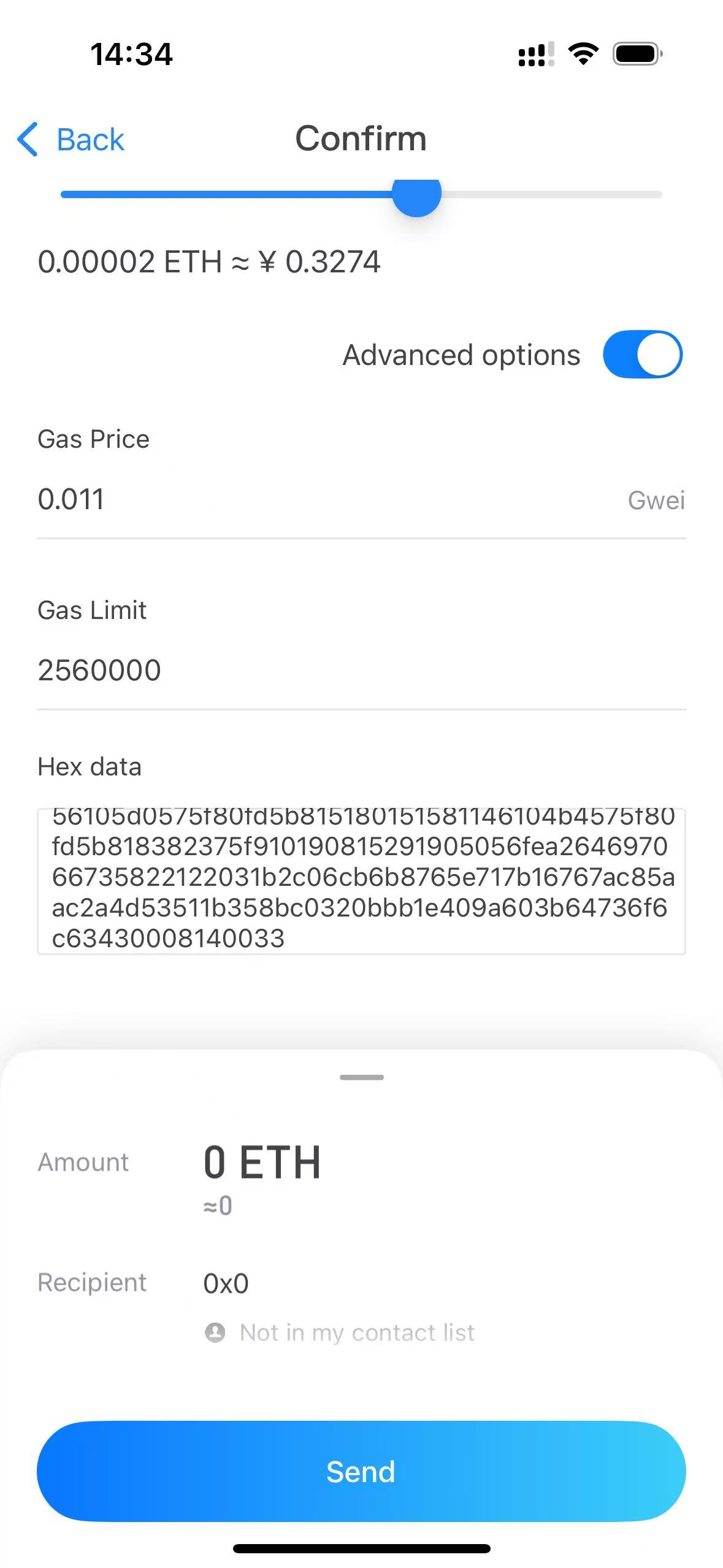
Tap Send and choose ETH · Optimism. Set the recipient to 0x0 — in Ownbit this means “deploy a contract.” Set Amount = 0. On Confirm, turn on Advanced options, set a sufficient Gas Limit (the example uses 2,560,000), and paste the Sweeper bytecode (below) into Hex data. Tap Send.
Use the full bytecode from the “Sweeper bytecode (deploy this)” section below as the Hex data here.
While using this imported deploy wallet, never send any transaction casually. Every transaction consumes the address’s nonce, and once the nonce moves forward you can no longer deploy the contract to the correct multisig address — the funds become permanently unrecoverable.

Verify the created address equals your multisig address
On the explorer, the transaction shows a contract creation: To [0x…eb2 Created]. This created address must equal your multisig address. If it matches, the Sweeper now sits exactly where your funds are. If it does not match, stop — the deploy address likely already had an outgoing transaction on this chain.
First look up the multisig address you’re recovering on that network’s block explorer: find the contract-creation transaction and note the nonce it used (for example, nonce = 3). Then confirm your imported deploy key is the same one that originally deployed the multisig. If the key is indeed the same and the target was created at nonce = 3, repeat the deployment with the same deploy wallet — creating the contract that many times (here, 3) until you reach the matching address — rather than burning the nonce on stray transactions.

Sweep the assets to yourself
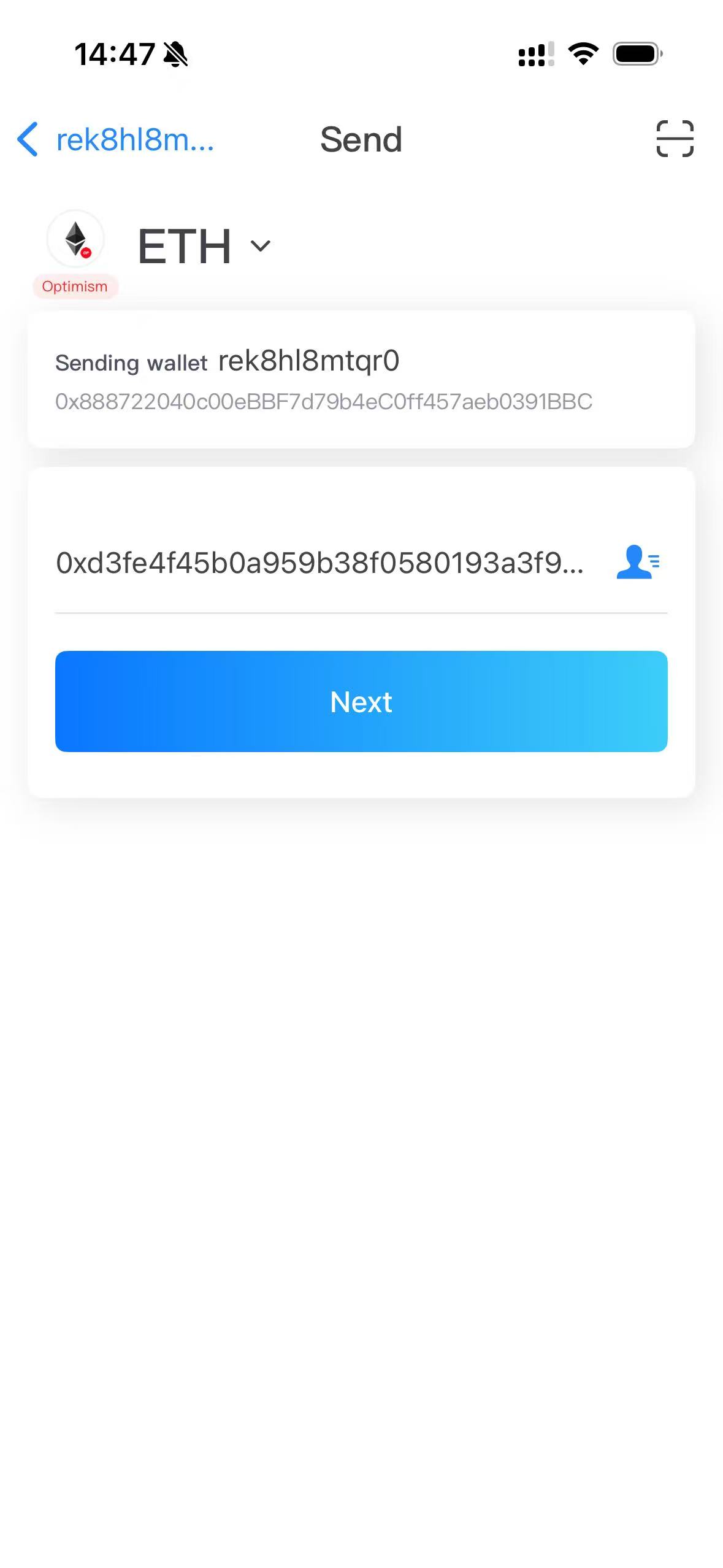
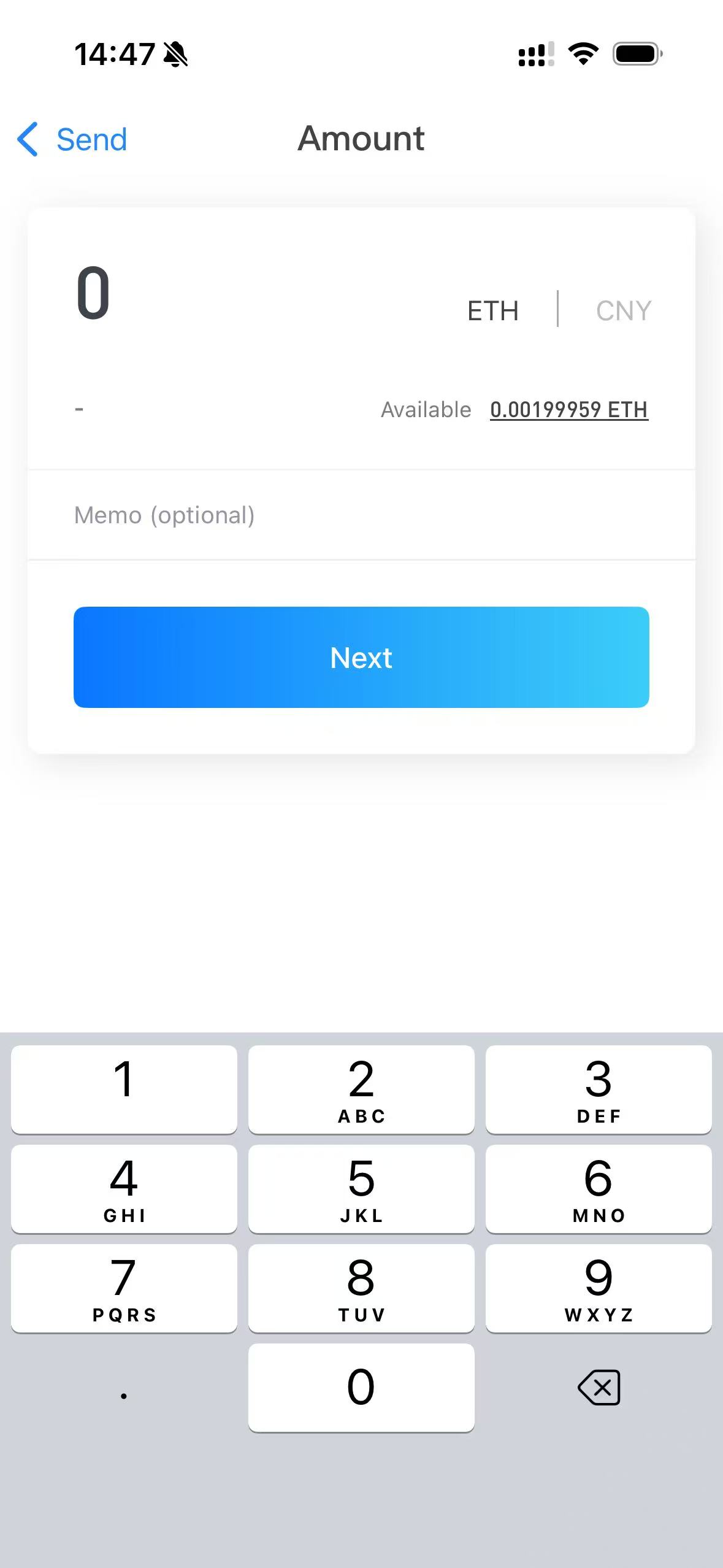
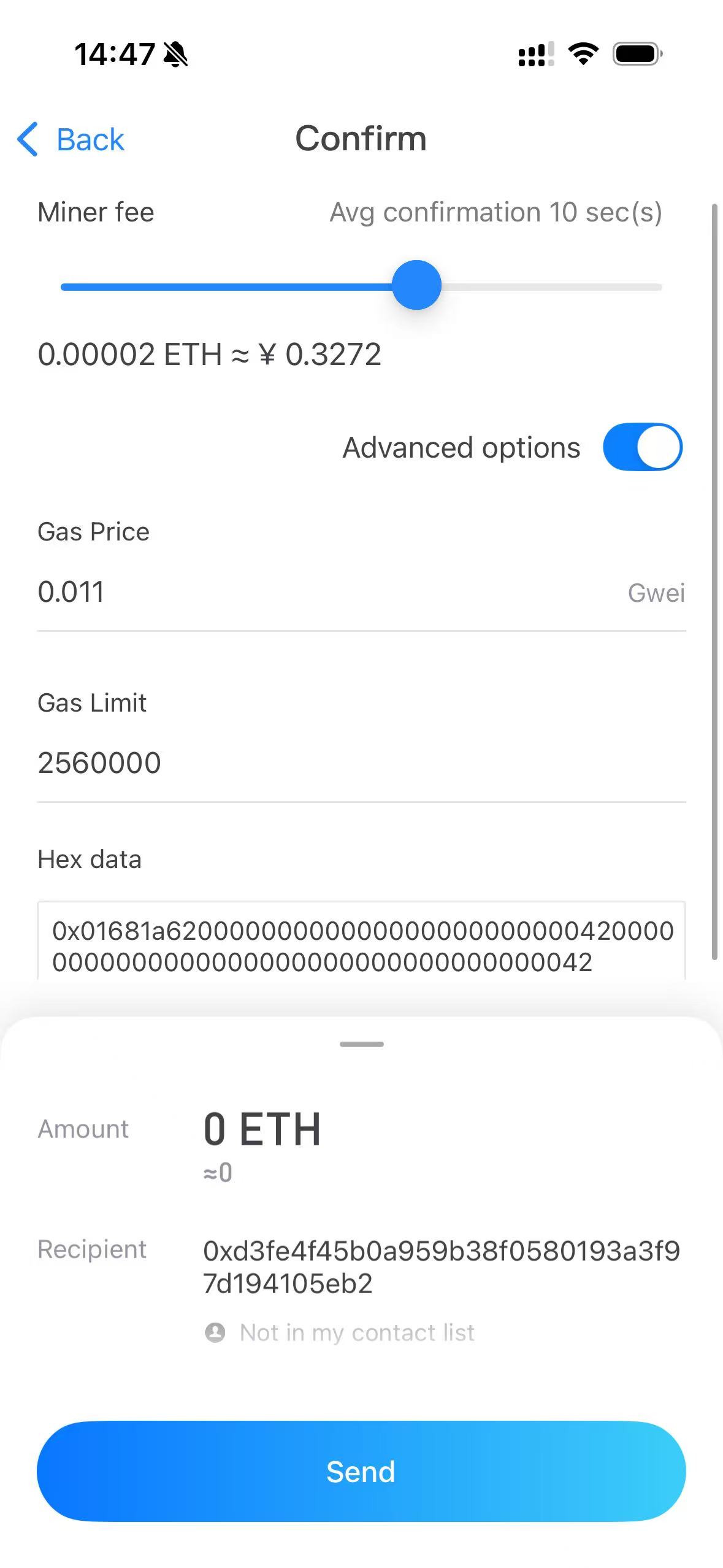
Tap Send again, choose ETH · Optimism, and set the recipient to the contract address you just created (your multisig address, e.g. 0xd3fe…eb2). Set Amount = 0. On Confirm, enable Advanced options, set the Gas Limit, and paste the call data into Hex data (see the next section). Tap Send.
Done — funds arrive in your deploy wallet
The swept asset (here +1 OP) lands in your deploy wallet. You can now move it anywhere. If a sweep transaction fails (e.g. gas too low), simply retry — it does not affect the already-deployed contract.

Building the sweep call data
There are two methods. Use one of them as the Hex data in step 6.
ERC-20 token — sweep(address)
Concatenate the selector and the token contract address, left-padded to 32 bytes:
01681a620000000000000000000000004200000000000000000000000000000000000042To sweep a different ERC-20, just replace the token address (keep the 24-zero padding).
Native coin — sweepETH()
No parameters. This sends the contract’s entire native balance (ETH/BNB/…) to the owner:
0xd47f6877Sweeper methods
0x01681a62
0xd47f6877
0x8da5cb5b
0x0565bb67
Sweeper bytecode (deploy this)
Paste this into Hex data when deploying in step 4. This is the authoritative artifact — it deploys the exact contract used in the screenshots.
0x60a060405234801561000f575f80fd5b503360805260805161062461004e5f395f818160b30152818161010c015281816101d10152818161029d0152818161038b01526103cb01526106245ff3fe608060405260043610610041575f3560e01c806301681a621461004c5780630565bb671461006d5780638da5cb5b146100a2578063d47f6877146100ed575f80fd5b3661004857005b5f80fd5b348015610057575f80fd5b5061006b61006636600461049b565b610101565b005b348015610078575f80fd5b5061008c6100873660046104bb565b610290565b604051610099919061053b565b60405180910390f35b3480156100ad575f80fd5b506100d57f000000000000000000000000000000000000000000000000000000000000000081565b6040516001600160a01b039091168152602001610099565b3480156100f8575f80fd5b5061006b610380565b336001600160a01b037f000000000000000000000000000000000000000000000000000000000000000016146101525760405162461bcd60e51b815260040161014990610586565b60405180910390fd5b6040516370a0823160e01b81523060048201525f906001600160a01b038316906370a0823190602401602060405180830381865afa158015610196573d5f803e3d5ffd5b505050506040513d601f19601f820116820180604052508101906101ba91906105a9565b60405163a9059cbb60e01b81526001600160a01b037f000000000000000000000000000000000000000000000000000000000000000081166004830152602482018390529192509083169063a9059cbb906044016020604051808303815f875af115801561022a573d5f803e3d5ffd5b505050506040513d601f19601f8201168201806040525081019061024e91906105c0565b61028c5760405162461bcd60e51b815260206004820152600f60248201526e1d1c985b9cd9995c8819985a5b1959608a1b6044820152606401610149565b5050565b6060336001600160a01b037f000000000000000000000000000000000000000000000000000000000000000016146102da5760405162461bcd60e51b815260040161014990610586565b5f80866001600160a01b03168686866040516102f79291906105df565b5f6040518083038185875af1925050503d805f8114610331576040519150601f19603f3d011682016040523d82523d5f602084013e610336565b606091505b5091509150816103765760405162461bcd60e51b815260206004820152600b60248201526a195e1958c819985a5b195960aa1b6044820152606401610149565b9695505050505050565b336001600160a01b037f000000000000000000000000000000000000000000000000000000000000000016146103c85760405162461bcd60e51b815260040161014990610586565b5f7f00000000000000000000000000000000000000000000000000000000000000006001600160a01b0316476040515f6040518083038185875af1925050503d805f8114610431576040519150601f19603f3d011682016040523d82523d5f602084013e610436565b606091505b505090508061047d5760405162461bcd60e51b8152602060048201526013602482015272195d1a081d1c985b9cd9995c8819985a5b1959606a1b6044820152606401610149565b50565b80356001600160a01b0381168114610496575f80fd5b919050565b5f602082840312156104ab575f80fd5b6104b482610480565b9392505050565b5f805f80606085870312156104ce575f80fd5b6104d785610480565b935060208501359250604085013567ffffffffffffffff808211156104fa575f80fd5b818701915087601f83011261050d575f80fd5b81358181111561051b575f80fd5b88602082850101111561052c575f80fd5b95989497505060200194505050565b5f6020808352835180828501525f5b818110156105665785810183015185820160400152820161054a565b505f604082860101526040601f19601f8301168501019250505092915050565b6020808252600990820152683737ba1037bbb732b960b91b604082015260600190565b5f602082840312156105b9575f80fd5b5051919050565b5f602082840312156105d0575f80fd5b815180151581146104b4575f80fd5b818382375f910190815291905056fea264697066735822122031b2c06cb6b8765e717b16767ac85aac2a4d53511b358bc0320bbb1e409a603b64736f6c63430008140033Sweeper.sol (reference source)
Reference implementation for verification, Solidity 0.8.20. The deployer becomes the immutable owner; only the owner can sweep.
// SPDX-License-Identifier: MIT
pragma solidity 0.8.20;

interface IERC20 {
    function balanceOf(address account) external view returns (uint256);
    function transfer(address to, uint256 amount) external returns (bool);
}

/// @title Sweeper
/// @notice Minimal single-key recovery contract. Deployed by the multisig's
///         deploy address so that it lands at the exact multisig address, then
///         used to move stuck assets to that deploy address (the owner).
contract Sweeper {
    address public immutable owner;

    constructor() {
        owner = msg.sender;
    }

    // Accept native coin (ETH/BNB/...).
    receive() external payable {}

    modifier onlyOwner() {
        require(msg.sender == owner, "not owner");
        _;
    }

    /// @notice Send this contract's full balance of `token` to the owner.
    /// selector: sweep(address) = 0x01681a62
    function sweep(address token) external onlyOwner {
        uint256 bal = IERC20(token).balanceOf(address(this));
        require(IERC20(token).transfer(owner, bal), "transfer failed");
    }

    /// @notice Send this contract's full native balance to the owner.
    /// selector: sweepETH() = 0xd47f6877
    function sweepETH() external onlyOwner {
        (bool ok, ) = owner.call{value: address(this).balance}("");
        require(ok, "send failed");
    }

    /// @notice Owner-only generic call, for advanced / non-standard assets.
    /// selector: execute(address,uint256,bytes) = 0x0565bb67
    function execute(address target, uint256 value, bytes calldata data)
        external
        onlyOwner
        returns (bytes memory)
    {
        (bool ok, bytes memory ret) = target.call{value: value}(data);
        require(ok, "call failed");
        return ret;
    }
}
Safety notes
- The deploy address’s private key has full control — handle it offline and never share it.
- Only the owner (deploy address) can call sweep — that’s why you import that exact key.
- Always confirm the created address equals your multisig address before sweeping.
- This Sweeper has no multisig protection — it is a single-key recovery tool. Move recovered assets to a safe wallet promptly.
- For a supported chain, prefer path A (recreate the multisig) instead of the Sweeper.
Once you’ve used this key online, consider it exposed. Don’t reuse it to guard meaningful balances afterward.